
AI Document Processing Payments and Billing 9 min read
The Hidden Cost of Unstructured Documents: What CFOs Need to See in 2026
 Ilona Yarmolovska
 Unstructured documents quietly drain finance, legal, compliance, and operations teams. See where the hidden cost sits in 2026 and how AI document automation turns scattered files into structured business data.
Ilona Yarmolovska 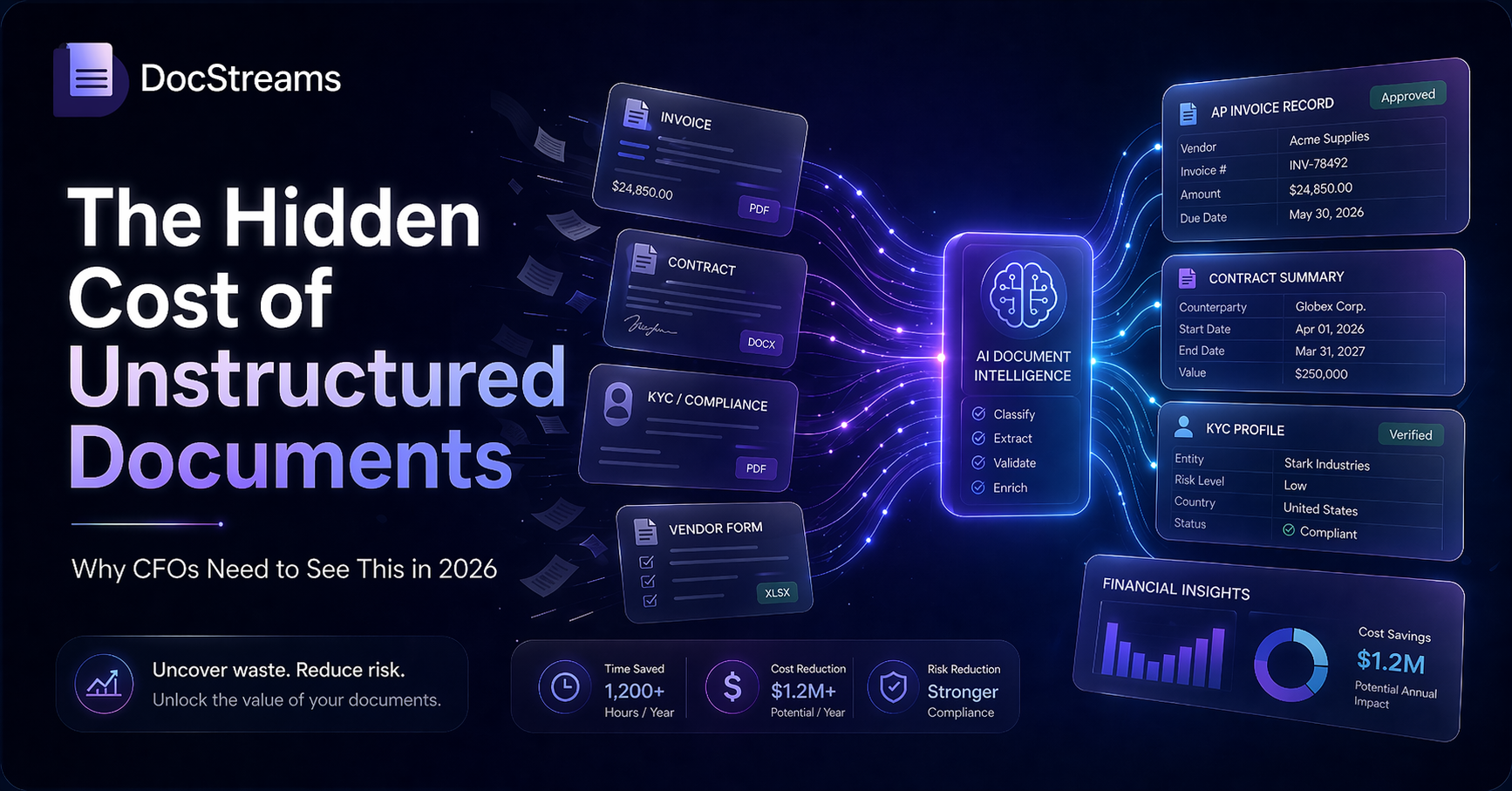
Most companies do not have a “document problem” on paper.
They have a finance team chasing invoice details. A legal team reviewing the same contract clauses again and again. A compliance team collecting evidence from emails, folders, spreadsheets, and PDFs. An operations team copying information from documents into systems that were never designed to talk to each other.
The problem is not the document itself. The problem is the work around it.
In 2026, that work is becoming harder to ignore. CFOs are under pressure to find efficiency gains without simply adding more people. Compliance teams need better evidence trails. Operations leaders need faster cycle times. And AI document processing has moved from experimental pilots into practical, measurable workflows.
Some teams call this “document debt.” A more practical way to describe it is this: the hidden cost created when business-critical information stays trapped inside unstructured documents.
What are unstructured document costs?
Unstructured document costs are the expenses created when teams have to manually read, extract, validate, transfer, correct, approve, and search for information across PDFs, scans, emails, attachments, forms, spreadsheets, and disconnected systems.
These costs rarely appear as one clean line in a budget. They are usually spread across finance operations, legal, compliance, HR, customer operations, logistics, external consultants, and business teams who are asked to “quickly check one more file.”
That is why the real cost is easy to underestimate.
A company may not track document work as a dedicated cost category, but it still pays for it through:
- manual data entry;
- repeated checks and approvals;
- duplicated records between systems;
- delayed reporting;
- compliance preparation;
- rework caused by missing or incorrect fields;
- slow handoffs between teams;
- expensive senior time spent searching for basic information.
This is where document automation becomes a CFO-level topic. Not because documents are new, but because the cost of handling them manually is now measurable.
Why this matters more in 2026
The conversation around document automation has changed.
A few years ago, many companies treated document processing as back-office admin work. Useful to improve, but not urgent enough to prioritize. In 2026, that mindset is becoming harder to defend.
There are three reasons.
1. Compliance now depends on evidence, not just reporting
Regulatory timelines are shifting, but the direction is clear: companies need better data lineage, stronger controls, and more reliable evidence trails.
In Europe, the CSRD timeline has changed for many organizations. The European Parliament’s “stop-the-clock” approach postponed reporting requirements for second- and third-wave companies, giving some businesses more time before mandatory reporting applies. But the delay does not remove the underlying operational challenge. Companies still need to know where their evidence sits, how reliable it is, and whether it can be retrieved when needed. Read more from the European Parliament on the CSRD postponement here: Omnibus I: sustainability reporting — “stop the clock” proposal.
In the U.S., climate disclosure rules have also become uncertain. In March 2025, the SEC voted to end its defense of the climate disclosure rules, which makes the enforcement path less predictable. But uncertainty does not mean companies can ignore auditability. Investors, partners, customers, and internal governance teams still expect cleaner data, better documentation, and stronger reporting processes. The SEC’s statement is available here: SEC Votes to End Defense of Climate Disclosure Rules.
The same pattern is visible in AI governance. The EU AI Act is being rolled out in stages, with obligations around governance, risk management, transparency, and high-risk AI systems becoming increasingly relevant for companies using AI in operational workflows. The European Commission’s implementation timeline is available here: Timeline for the Implementation of the EU AI Act.
The takeaway for CFOs is simple: even when regulations shift, the burden of proof is not going away. Companies need structured, traceable, retrievable data. Manual document handling makes that harder.
2. Manual document work is becoming too expensive to hide
Document-heavy workflows are often underestimated because they are fragmented.
Invoice processing sits in finance. Contract review sits in legal. KYC files sit in compliance. Delivery notes, bills of lading, inspection reports, and certificates sit in operations. CVs and candidate documents sit in recruitment. Each team sees only its own part of the problem.
The CFO sees the whole cost base.
That is why document work is starting to look less like admin noise and more like a hidden operating cost. When teams spend hours extracting the same data, correcting errors, checking fields, and moving information between tools, the business pays twice: once in labor cost, and again in slower decisions.
Accounts payable is a clear example. AP benchmarks regularly track cost per invoice, invoice cycle time, invoice volume per full-time employee, and automation impact. IOFM’s AP benchmarking work highlights these metrics as core indicators for finance teams that want to understand how efficient their invoice operations really are. See IOFM’s AP benchmarking overview here: Benchmarking Your AP Performance: Insights from IOFM’s 2025 Survey.
But invoices are only one part of the picture. The same cost pattern appears wherever documents carry business-critical data.
Where unstructured document costs show up first
For most mid-market and enterprise teams, the cost becomes visible in four workflows.
1. Supplier invoice intake
Invoice intake is one of the easiest workflows to measure because the volume is clear.
A supplier invoice arrives by email, portal, scan, or PDF. Someone has to read it, extract key fields, match it with a purchase order or delivery note, validate the supplier, check tax details, resolve exceptions, and push the data into an ERP or accounting system.
When this is manual, every invoice creates small delays. At scale, those delays become material.
The cost is not only data entry. It also includes late approvals, missed early-payment discounts, duplicate payments, exception handling, month-end pressure, and the time finance teams spend chasing missing information.
With AI document processing, invoices can be captured, classified, extracted, validated, and routed automatically. Human review remains where it matters: exceptions, approvals, and edge cases.
That is the real value. Automation should not remove control. It should remove the repetitive work that makes control harder.
2. Contract intake and review
Contracts are another high-cost document category because they are rarely just “read and approve.”
Teams need to find renewal dates, payment terms, liability clauses, termination rights, governing law, pricing conditions, service-level commitments, and deviations from standard language.
When that information is buried inside PDFs or Word documents, legal and commercial teams spend too much time locating details that should already be structured.
AI document processing can extract key clauses, identify missing fields, compare contract versions, flag unusual terms, and make contract data searchable across the business.
This does not replace legal judgment. It gives legal and finance teams a cleaner starting point.
3. KYC, compliance, and audit documentation
Compliance teams often look like they are doing compliance work, but a large part of their day is document preparation.
They collect files, check completeness, verify dates, compare data across sources, request missing documents, prepare evidence, and maintain records for audit or regulatory review.
This work becomes more painful as the number of documents grows. It also becomes riskier when information lives across inboxes, spreadsheets, shared folders, portals, and legacy systems.
For compliance-heavy teams, the question is not only “Can we process documents faster?”
The better question is: “Can we prove what happened, when it happened, where the data came from, and who approved it?”
AI document automation helps by turning unstructured files into structured, searchable, auditable data. That gives teams more confidence when they need to respond to internal reviews, customer requests, regulatory checks, or external audits.
4. Industry-specific operational documents
Every industry has its own document burden.
In logistics, it may be bills of lading, delivery notes, customs declarations, cargo manifests, certificates of origin, and claims documents.
In healthcare, it may be clinical documents, patient forms, lab results, referrals, insurance files, and consent documentation.
In oil and gas, it may be inspection reports, certificates, safety documentation, and field reports.
In HR and recruiting, it may be CVs, job descriptions, candidate summaries, interview notes, and compliance documents.
The names change, but the workflow problem is similar: critical information arrives in unstructured formats, then people spend hours making it usable.
This is exactly where AI document processing creates measurable value. It turns documents into structured data that can move into the systems teams already use: ERP, CRM, ATS, HRIS, compliance tools, analytics platforms, or internal workflows.
Why CFOs should treat this as an operating model issue
The biggest mistake is treating document automation as a narrow software decision.
It is not only about buying a tool that can read PDFs. It is about changing how information enters the business.
A document-heavy workflow usually touches several cost areas at once:
- labor cost;
- approval speed;
- reporting quality;
- audit readiness;
- customer response time;
- compliance risk;
- working capital;
- team capacity;
- data quality inside core systems.
That is why CFOs should look at document automation through an operating model lens.
If business-critical information enters the company as unstructured documents, and people manually transform it into usable data, then the company has a structural efficiency problem. The more it scales, the more that problem compounds.
What CFOs should measure before choosing a document automation tool
The first step is not vendor evaluation.
The first step is a document workflow inventory.
Before comparing tools, CFOs and operations leaders should answer seven practical questions.
1. Which document workflows have the highest volume?
Start with volume. How many invoices, contracts, compliance files, logistics documents, CVs, claims, forms, or reports does the business process each month?
High-volume workflows are often the fastest place to prove ROI.
2. How many manual touchpoints does each document require?
A document may pass through intake, classification, extraction, validation, approval, exception handling, system entry, and archiving.
Every touchpoint adds time, cost, and risk.
3. How long does processing take from arrival to completion?
Cycle time matters because slow document processing often delays something else: payment, onboarding, reporting, shipment release, contract approval, claim resolution, or candidate presentation.
4. Where do errors and rework happen?
Missing fields, incorrect extraction, duplicate records, outdated templates, and inconsistent naming conventions can quietly consume team capacity.
This is where automation can create value beyond speed. It can improve data consistency.
5. Which systems need the extracted data?
A document automation project is only useful if the structured data can move where it needs to go.
For finance, that may be ERP or accounting software. For recruiting, it may be an ATS. For sales or customer operations, it may be CRM. For compliance, it may be a document management or audit system.
Integration matters because the goal is not to create another isolated database. The goal is to make document data usable across the business.
6. Which documents create compliance or audit exposure?
Some documents are not just operational. They are evidence.
If a document supports a regulatory claim, financial report, customer obligation, insurance case, or legal process, then the business needs more than extraction. It needs traceability, version control, access control, and a reliable audit trail.
7. What is the cost of doing nothing?
This is the question most teams skip.
The cost of doing nothing is not zero. It is the ongoing cost of manual work, delayed decisions, avoidable errors, team overload, compliance preparation, and operational drag.
Once that cost is visible, document automation becomes easier to evaluate as an investment.
What good document automation looks like in 2026
In 2026, document automation should not mean a generic OCR layer that extracts a few fields and leaves the team to fix everything manually.
A modern document automation workflow should be able to:
- capture documents from multiple sources;
- classify document types automatically;
- extract relevant fields with context;
- validate data against business rules;
- flag missing or suspicious information;
- keep a human review step where needed;
- send structured data into existing systems;
- support audit trails and traceability;
- improve over time as workflows become clearer.
The real shift is from document storage to document intelligence.
Storage answers: “Where is the file?”
Document intelligence answers: “What does this file contain, what should happen next, and where should the data go?”
That is the difference CFOs should care about.
Where DocStreams fits in
DocStreams helps teams turn unstructured documents into structured, usable business data.
The platform is designed for workflows where documents are not just files, but operational inputs: invoices, contracts, compliance documents, logistics files, HR and recruiting documents, industry-specific forms, and other business-critical records.
Instead of forcing teams to manually copy, check, reformat, and move data, DocStreams helps automate the document flow:
- document intake;
- AI-based classification;
- key data extraction;
- validation and review;
- structured output;
- integration into business workflows.
For finance teams, this can mean faster invoice processing and cleaner approval flows.
For compliance teams, it can mean better evidence trails and easier document review.
For operations teams, it can mean fewer bottlenecks around logistics, inspection, clinical, or field documentation.
For recruiting and HR teams, it can mean faster CV processing, standardized candidate documents, and clearer candidate-to-role summaries.
You can explore practical examples on the DocStreams use cases page: DocStreams use cases.
The CFO takeaway
Unstructured documents are not a small admin issue anymore.
They shape how fast a company pays suppliers, reviews contracts, prepares audits, handles compliance, serves customers, processes operational records, and makes decisions.
In 2026, the companies that measure this work properly will have an advantage. They will see where time is lost, where errors enter the process, where teams are overloaded, and where automation can create the fastest return.
The goal is not to automate documents for the sake of automation.
The goal is to make business-critical information usable from the moment it enters the company.
That is where document automation becomes more than a productivity tool. It becomes part of the operating model.
And for CFOs, that is the real conversation: not how many documents the company has, but how much those documents cost when the data inside them stays trapped.